

Your Fashion Show
Control Centre
One production system for fashion shows — managing every stage and every document in one place.
Created by fashion show producers with over 20+ years of experience producing major shows globally.

Scan & Set Up Your Next Show
Sign up free, no credit card required until you create a show.
Production Continuity
What slows productions down isn’t lack of planning.
It’s keeping information aligned as the production moves forward.
First Face keeps all production information connected in
one platform, so nothing has to be rebuilt.

Model Management
Simplified
Upload your comp cards. We’ll handle the rest!
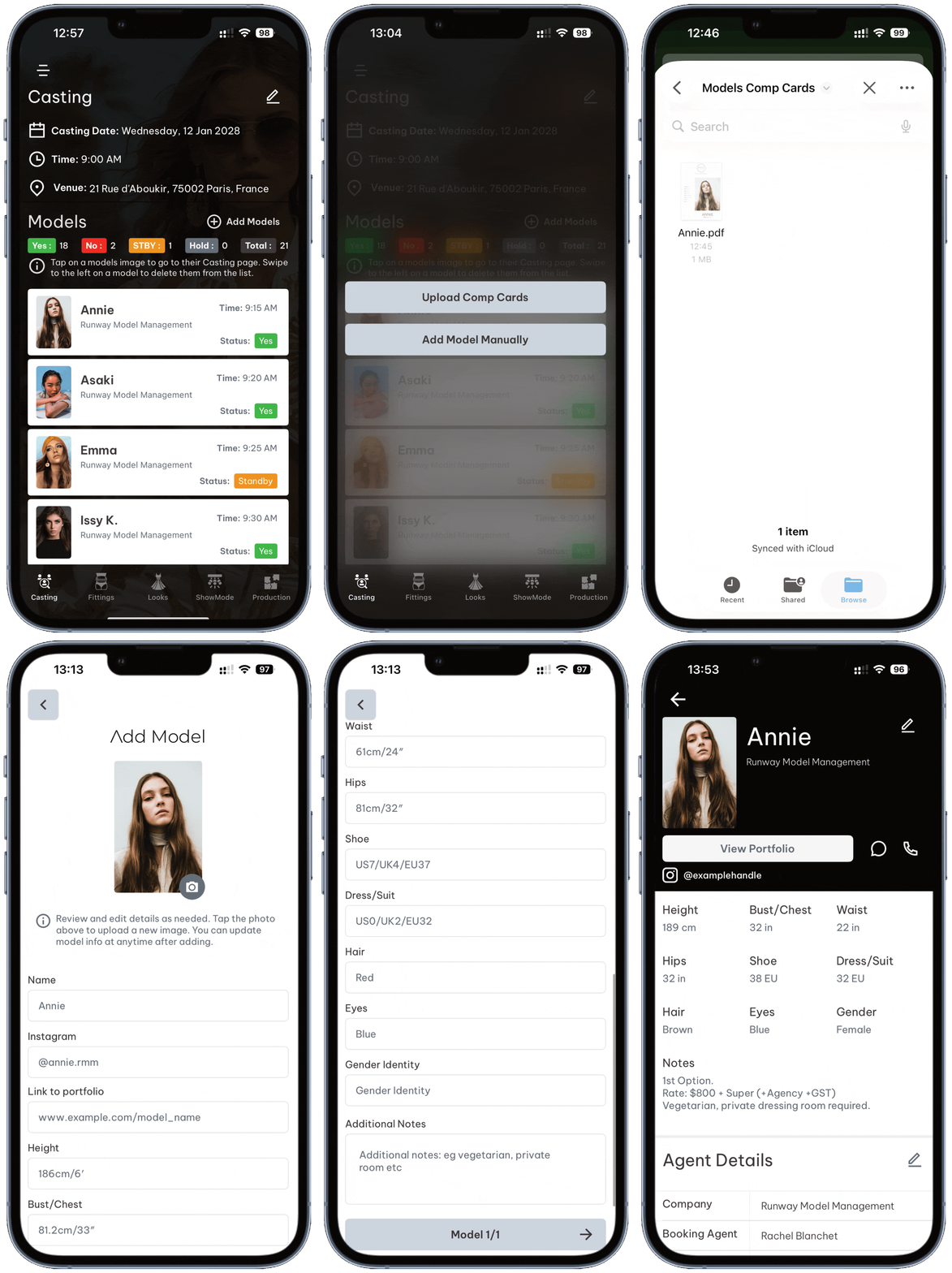
First Face introduces AI-powered comp card scanning that automatically detects model information, including headshots and measurements, and converts it into a ready-to-use model profile.
Those profiles are instantly added to your show and casting workflow, so the information stays consistent as the production moves forward.
• Less repetitive admin.
• Fewer errors.
• Faster decisions across the team

Single Source of Truth
The ultimate hub for your creative team.

The Production Dashboard consolidates all essential project details at your fingertips. Manage models, track guest seating, upload creative assets, and access PR information. Quickly view venue location information and weather updates, search for a team member, and access production schedules. All designed for simplicity and team-wide alignment.

From Casting to Show
Everything connects. Nothing gets recreated.

Castings
Build casting lists fast, schedule models by time, and categorise with Yes, No, Standby, and Hold. “Yes” automatically flows into fittings — no rebuilding.

Fittings
Assign looks, track alterations and notes, and store reference photos in the same workflow, so the team stays aligned as changes happen.

Look Order
Drag-and-drop show order with quick-change warnings, so timing stays realistic as the show evolves.

Show Mode
Enter show timing once and run the live execution with clear cues for exits, music, and critical calls when the show goes live.

Working in Sync
All tasks in one place!

Assign tasks, attach references, set due dates, and keep accountability clear across the production.
My Tasks is designed for show teams, so the operational layer stays tight while creative work stays uninterrupted.

Instant Outputs
Production Documents, generated for you!
Generate rack cards, fitting schedules, look orders, and hair & makeup checklists. All pulled from the same live production data.

Generate rack cards instantly so the team can focus on production, not formatting.

Create and print look board images with look numbers and model names for clean, consistent organisation.

Guest Control
Seating Plans Made Simple

Build precise seating plans, upload guest lists, and allocate seats quickly with clear categories for VIP, media, influencers, and key stakeholders.
Edits update instantly, so front-of-house always work from the latest version across mobile and web.

Less Admin Time!
Less time on admin, more time on the show
Production Hours
First Face reduces the time spent maintaining production documents and reconnecting information between stages.
The payoff is simple: fewer manual handoffs, fewer avoidable errors, and more time for the work that actually improves the show.

Join Teams Free!

If you’re invited to a show, it’s free to join. The show creator controls what you can edit and view, so you always have access to what you need — and nothing you don’t.
Pricing
Only show creators pay. Team members join for free.
No credit card required until you create a show. Cancel anytime.
TEAM
CONNECT
Create a free industry profile
and connect with show creators.
Free
Best experienced on the mobile app

Or get started via the web
No credit card required
Free Industry Profile
Receive team invitations
Join teams for Free
Explore a Demo Show
 Take a tour through a demo show in the app before creating your own or entering any payment details - see how First Face works and make sure it’s the right fit for you.
Upgrade anytime by creating a show
iOS, Android* and Web App
Chat Support
*Android Coming Soon.
SHOW
CREATOR
Perfect for fashion week producers,
freelancers and agencies.
10% OFF
Introductory offer, usually $99/month
Use code “CREATOR10” at checkout.
$89AUD/month
Best experienced on the mobile app
Or get started via the web
No credit card required until you create a show.
Cancel anytime
One Plan, One Price
ALL Features
3 concurrent shows included
3 shows/projects can be worked on simultaneously within the app or online.
Additional shows/projects can be added for $9.50 per project / per month. Purchased shows come with 2 free core team members.
2 Core Team Members Per Show
You can add 2 x Core Team members per show for free. These are normally core production personnel within your organisation and have full edit access to shows, or you can
choose custom permissions.
Additional core team members can be added for $3.50 per month/per show.
It's important to note that core team members have different permissions to collaborators.
Unlimited Collaborators
Add Unlimited Project Collaborators. These are essential personnel, including suppliers, hair and makeup teams, backstage staff, venue staff, and crew. They can be granted edit access to one
specific section of the app while viewing other areas you choose to share. This allows the broader team to easily access production schedules, call times, venue details, and other important information.
Try Risk-Free for 48hrs
Subscribe with confidence - if you change your mind, you can request a full refund within 48 hours of subscribing, no questions asked.
Workflows
Casting Workflow
Easily add models to your casting list, schedule models by time based on your casting timeframe. Categorise models into simple Yes, No, Standby and Hold categories with a simple tap of your finger. Models that are categorised as "Yes" are automatically sent to the fittings workflow within the app.
Fitting Workflow
Seamlessly assign looks, add styling and alteration notes and upload photos for reference. Once models have been assigned looks they are automatically added to the Look Order workflow.
Look Order Workflow
Manage the look order of your show with an intuitive drag-and-drop design. Arrange looks and models effortlessly while receiving intelligent quick change warnings to ensure models with multiple looks have plenty of time to change.
Show Mode
First Face assists show callers visually with accurately timed model exit cue's during the show. Users can also add lighting, video or audio cues to show mode ensuring a perfectly executed show.
Production Dashboard
Team Search
Use this feature within the Production Dashboard to search for team members quickly. Easily locate the person you're looking for and access their profile to call or message them with a single press.
Production Schedule
Easily upload a read only version of your production schedule. Allow team members to view the schedule to keep everyone in sync.
Task Manager
Assign tasks to yourself or your team. Set descriptions, add attachments, set due dates and prioritize what’s most important. Notifications help keep everyone on the same page, reminding
team members of upcoming deadlines and ensuring timely completion.
Show Order
Quickly view the current show order and tap on any model to see their looks, images, and styling notes.
Model Checklist
Track all your models with this interactive list within the Production Dashboard. Backstage team members and model chaperones can check off models as they arrive and update their status in hair and makeup. Missing a model? Tap their image to access their profile and send a message or make a call.
Show Data
Access all the essential data and stats for your show in the Production Dashboard, including the number of looks, quick change warnings, models with changes, and the total number of seats, along with other valuable information.
Creative Assets
Securely and effortlessly add essential show documents like technical plans, hair and makeup briefs, seating plans, and other creative assets to the Production Dashboard, ensuring your team always has the information they need.
Venue and Location Info
Access essential venue and location details within Production Dashboard, including WiFi information, emergency services, safety guidelines, and local points of interest such as the nearest doctor or shopping areas.
P.R Info
Access all your public relations details within the Production Dashboard. Add the PR company's information, details on gifting for seats, sponsor information and essential PR assets such as guest and media lists.
Tools
Task Manager
Assign tasks to yourself or your team. Set descriptions, add attachments, set due dates and prioritize what’s most important. Notifications help keep everyone on the same page, reminding team members of upcoming deadlines and ensuring timely completion.
Agency Connect
If an agency already has an account, simply invite one of their account managers to join your show team. They’ll be able to add models to your casting list and will be notified of successful models when you select ‘Notify.’ Rest assured, agencies cannot view models from other agencies in your casting list.
Seating Plan Creator
Create a seating map based on your floor plan. Seating maps can include Sections, Rows and Seat labels. Once created, start adding guests using the guest management tools.
Guest Management
Upload a .CSV of your guest list and easily allocate seats, while also adding important guest details. Color code seats to easily see at a glance where guests such as VIP's, Media & brand ambassadors are sitting. Once all guests are added download a .CSV and upload to your favourite email marketing software to send tickets and invitations.
Auto-Generate Rack Cards
Generate comp cards/rack cards of each model for fittings and rack cards for the show complete with looks and styling notes.
Auto-Generate Look Boards
At the press of a button First Face will generate images of each model in their look complete with model name and their look number.
50GB Asset Storage
You receive a total of 50GB worth of secure document storage.
Add additional Shows ($9.50)
Add additional shows/projects at any time charged at $9.50 per project per month.
Add Core Team Members ($3.50)
Additional core team member seats can be added for $3.50 per month / per person /per show.
Advanced Account Permissions
When inviting team members or guests select specific permissions for various areas within the app. You can also save these permissions as a template to easily apply these to other team
members.
Syncing across Platforms
Pull to refresh within the app updates/syncs all information across all devices and platforms.*
*User must be connected to WiFi or Cellular Data to sync. Some areas of the app will notify you of changes and when to refresh.
Free Industry Profile
By creating a free profile, you open doors to opportunities with show producers, casting agents, and brands. They can easily send invites, and seamlessly integrate you into their production team or casting.
We don't charge you to have a profile or to be added to a team. You only pay a fee if you create a show.
iOS, Android* and Web App
Available on multiple platforms with real-time syncing*, so your team never misses a change.
*When connected to a data network, WiFi, 5G etc.
Join show teams effortlessly
Upon accepting an invitation you have instant access to the project from your My Shows page.
Chat & Email Support
We aim to answers emails within 8hrs.
*Android Coming Soon.
Best experienced on the app!
Or get started via the webapp.